Automating Repetitive BIM Tasks: How Much Time and Money It Saves
MEPF automation in BIM coordination refers to the use of scripts, macros, and programmatic tools to perform repetitive modelling and coordination tasks that would otherwise require manual input from a BIM coordinator. The most common automation platform in the Revit ecosystem is Dynamo — a visual programming environment that executes sequences of operations within Revit models without manual intervention.
MEPF automation in BIM coordination refers to the use of scripts, macros, and programmatic tools to perform repetitive modelling and coordination tasks that would otherwise require manual input from a BIM coordinator. The most common automation platform in the Revit ecosystem is Dynamo — a visual programming environment that executes sequences of operations within Revit models without manual intervention.
The financial case for automation is straightforward. A BIM coordinator's hourly rate ranges from €60 to €100 per hour (PowerKH, 2025 — US market data). Repetitive tasks — parameter population, view creation, sheet setup, element tagging, clash result sorting, report generation — consume a measurable portion of every coordination project. Industry experience indicates that 25–40% of a coordinator's time on a typical project is spent on tasks that can be partially or fully automated.
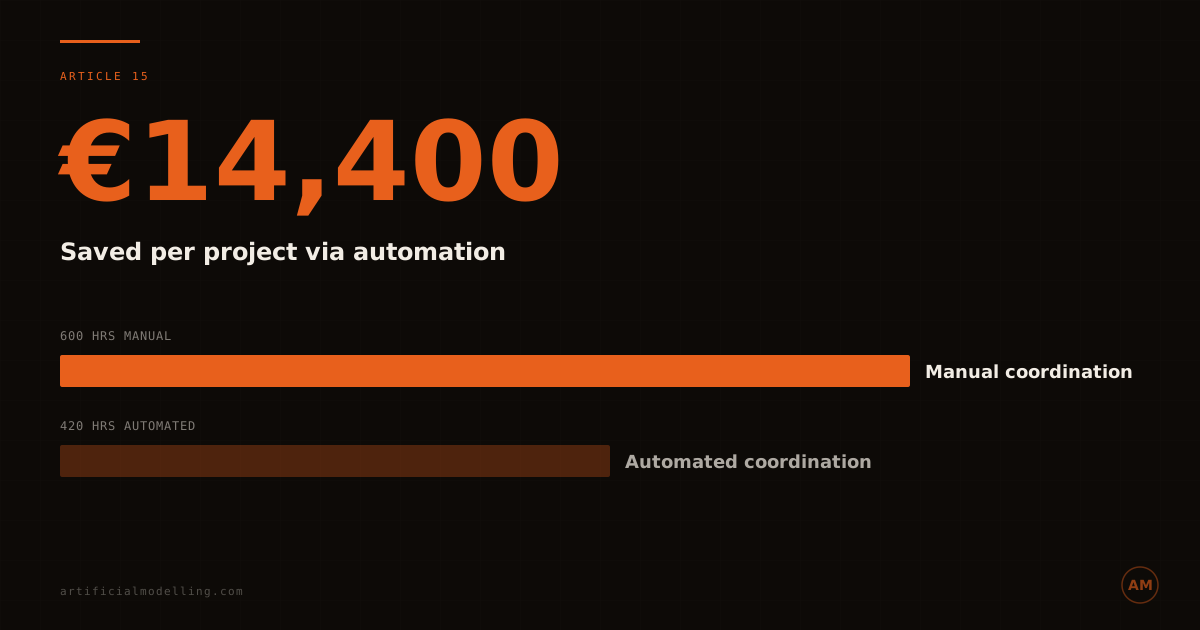
On a project requiring 600 coordinator hours, 30% automation of repetitive tasks saves 180 hours. At €80/hr, that is €14,400 in direct cost savings on a single project. Over a year with 4–6 projects, the annual saving reaches €57,600–€86,400.
What Can Be Automated
Not every BIM coordination task lends itself to automation. The tasks that produce the highest return are those that are repetitive, rule-based, and high-volume.
Parameter population is the most automatable task. Setting shared parameters across thousands of elements — system type, installation zone, coordination status, trade responsibility — can take days when done manually. A Dynamo script performs the same operation in minutes, applying consistent values based on element category, family type, and location.
View and sheet creation for coordination drawings follows standardised patterns. For a multi-storey building, creating section views at every coordination zone, placing them on sheets with the correct title block, and applying view templates is the same sequence of operations repeated dozens or hundreds of times. Automated view creation reduces what would be 8–16 hours of manual work to under 30 minutes.
Clash result processing from Navisworks exports generates large datasets that need sorting, filtering, and categorising. A script that ingests the clash report, groups results by zone and trade, assigns priority ratings based on system size and type, and formats the output for distribution saves 4–8 hours per coordination cycle. On a project with 10 coordination cycles, that is 40–80 hours saved.
Report generation — coordination status reports, model audit summaries, element count matrices — follows the same pattern. The data exists in the model. Extracting it, formatting it, and generating the report is pure repetition.
What Cannot Be Automated
Automation handles the mechanical aspects of coordination. It does not replace engineering judgement.
Clash resolution — deciding whether to move the duct or the pipe, and by how much — requires understanding of flow dynamics, installation access, maintenance clearances, and construction sequencing. This is the domain of an experienced coordinator, not a script.
Design intent interpretation — understanding why a designer routed a service in a particular way, and whether an alternative route would compromise system performance — requires communication between disciplines. No automation tool can replicate this.
Quality assessment — determining whether a proposed resolution is buildable, maintainable, and compliant — requires site experience. A script can tell you that two elements clash. Only a coordinator with construction experience can tell you whether the proposed resolution will work on the steel deck.
The ROI Calculation
The return on investment for BIM automation depends on three factors: the upfront development cost of the scripts, the time saved per project, and the number of projects over which the investment is amortised.
Developing a suite of Dynamo scripts for common coordination tasks typically requires 80–200 hours of development time — a one-off investment of €6,400–€20,000 at developer rates. Maintenance and updates add 20–40 hours per year.
The payback period is typically 1–2 projects. If automation saves 150 hours per project at €80/hr (€12,000), and the development cost was €15,000, the investment is recovered halfway through the second project. Every subsequent project delivers the saving directly to the bottom line.
For firms processing multiple coordination projects per year, the cumulative saving is substantial. A team running 6 projects annually with 150 hours saved per project generates €72,000 in annual savings against a one-off development cost of €15,000 plus €3,000/year in maintenance. The annual net saving is approximately €54,000.
FAQ
How much time does BIM automation save per project?
Automation of repetitive tasks — parameter population, view creation, clash result processing, and report generation — typically saves 120–300 hours per coordination project. The exact saving depends on project size, the number of coordination cycles, and the scope of automation deployed.
What tools are used for BIM automation?
Dynamo (the visual programming platform within Revit) is the most common tool for coordination automation. Python scripts via pyRevit, Grasshopper for Rhino-based workflows, and custom plugins using the Revit API are also used. The choice depends on the team's technical capability and the tasks being automated.
Is the upfront cost of developing automation worth it?
For firms running 3+ coordination projects per year, the payback period is typically 1–2 projects. A development investment of €10,000–€20,000 generates annual savings of €40,000–€90,000 once amortised across multiple projects.
Artificial Modelling uses automation to deliver faster, more accurate coordination at lower cost. Fixed-price. Efficient. See how →